
How Can I Update My Payment Information? copyUpdated 4 months ago
STEP 1: Access your UMZU account.
For help, click here: Account Access Instructions
STEP 2: Once you've successfully logged in, select "Manage Subscriptions".
STEP 3: Click on one of your subscriptions and "view details"
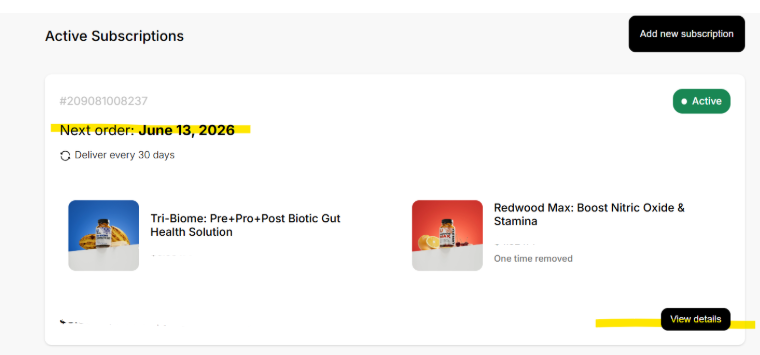
STEP 4: Scroll down to the bottom of the page to "Payment Details"
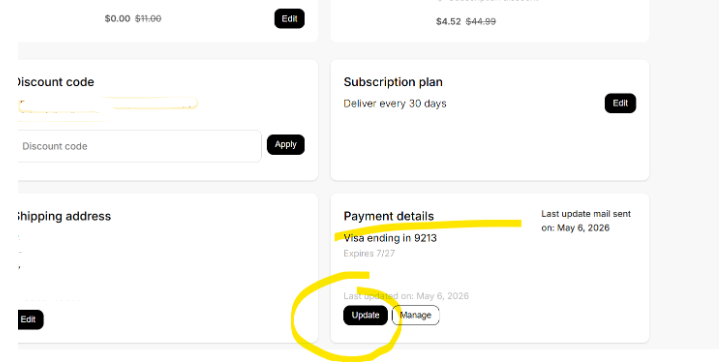
STEP 5: and select "Update" to add a new card.
Step 6: Edit card details, then click "Update card".
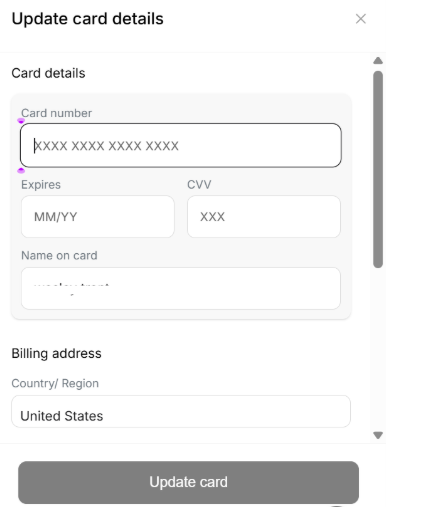
*Note: We're unable to accept prepaid cards for subscription orders or HSA/FSA cards. You will not be able to choose another third-party app for payment, such as Apple Pay, Google Pay, or PayPal Express, as these will need new billing agreements that can only be approved by the customer and can not be established by a UMZU team member. At that point, we suggest you cancel your existing subscription and reorder at the UMZU checkout. If that poses any significant issues, please reach out to [email protected].