
How Can I Use My Loyalty Credits at Checkout?Updated 10 days ago
- If you're using a computer, go to UMZU.com and click the account icon, log in to your account using the same email address you use to place your orders.

- Next, add the products you would like to purchase to your cart and proceed to checkout. You will see a box that says "Store Credits to use." Just above that box, it shows how much cash-back you have in your account. Enter the amount you want to use for this purchase into the box, then click "Apply". NOTE: Cash-back redemptions can only be used on the subtotal (or product spend) and do not apply to taxes, shipping costs, or discounts on the order.
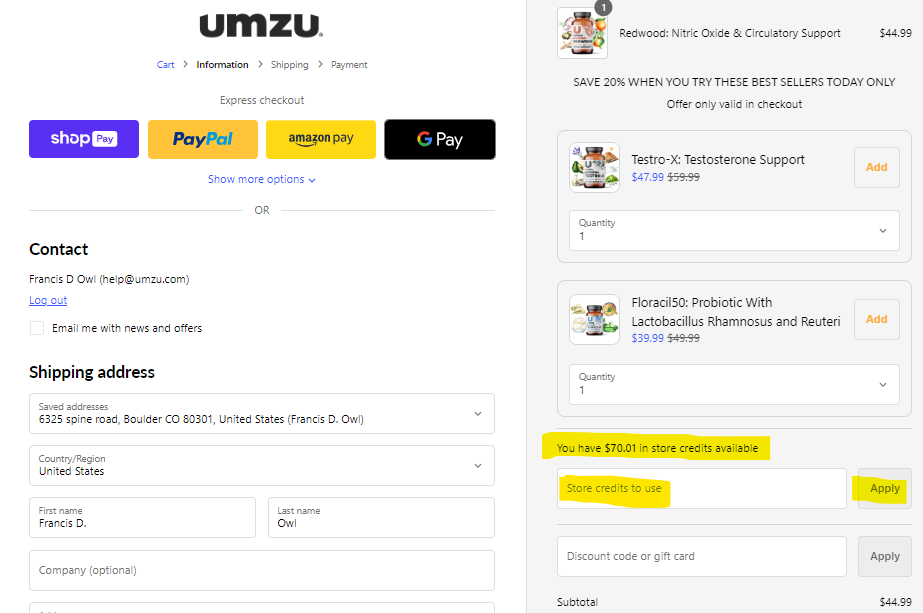
- The discount will be applied. Proceed to complete your purchase.
Note: Please view and utilize Loyalty Rewards via a web browser on a computer or a mobile device. The Umzu app does not yet contain full rewards functionality.